Sensor fusion is increasingly important across a range of applications including automotive, industrial, consumer, portable, medical systems and others. It can be challenging to sort out the design issues and identify the optimal solution. That’s where electronic design automation (EDA) tools are handy. The best choice of EDA tool or tools for a given project depends on several factors like what’s already available in the development lab, how complex the integration challenges are, and so on.
This second of two FAQs looks at EDA tool sources including general-purpose EDA software and specialist EDA software and presents a few exemplary tools for a variety of sensor technologies. It’s not intended to be exhaustive, but rather to provide “food for thought.” Part one presented examples of tools from component makers.
Sensor fusion for autonomous vehicles
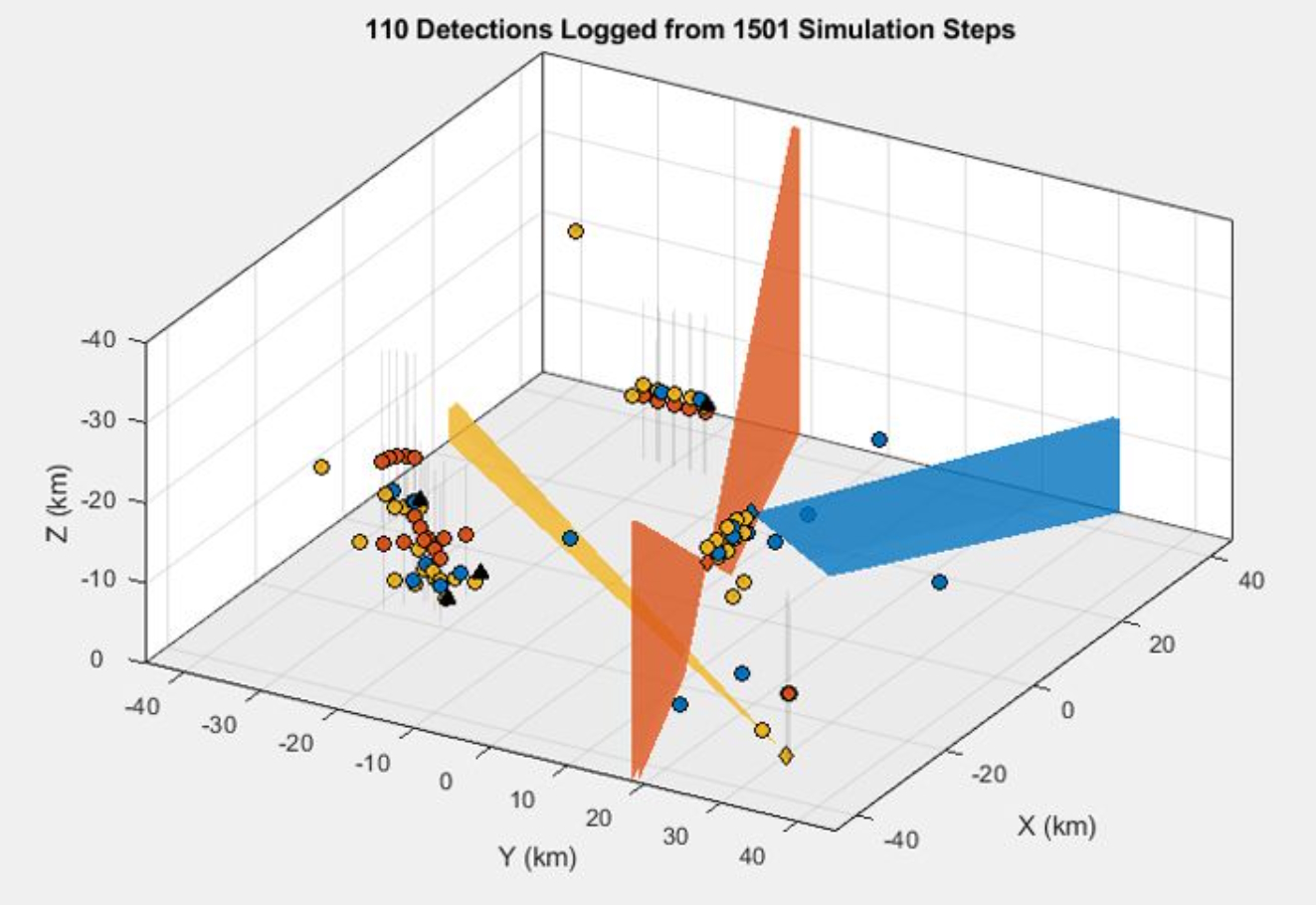
MathWorks offers several suites of tools for sensor fusion designs including their Sensor Fusion and Tracking Toolbox and Sensor Fusion and Navigation for Autonomous Systems tools. The Sensor Fusion and Tracking Toolbox includes software algorithms and tools for designing, simulation and testing of systems that combine multiple sensors. Exemplary designs are included for multiple object tracking and sensor fusion for autonomous and surveillance systems in ground, airborne, shipborne, underwater and space based systems. This toolbox includes active and passive radar, sonar, LiDAR, electro-optical (EO) and infrared (IR) sensors inertial measurement units (IMUs) and global positioning systems (GPS). Plus designers can generate synthetic data from virtual sensors. An example of the numerous tools is the Scenario Visualization Plot that (Figure 1):
- captures the orientation and velocity of objects, ground truth trajectories, sensor measurements, and tracks in 3D.
- plots detection and track uncertainties.
- visualizes track IDs with history trails.
Designers of autonomous mobile robots (AMRs) unmanned autonomous aerial vehicles (UAVs) and self-driving cars and trucks can turn to MathWorks tools including MATLAB and Simulink for sensor fusion and navigation. Algorithms are available that support:
- perception design using deep machine learning.
- sensor data fusion for situational awareness.
- simultaneous localization and mapping (SLAM) algorithms fusing data from cameras, LiDAR, radar, and other sensors.
- obstacle avoidance, path planning, and control design.
Touch sensors and signal chains
Dedicated EDA tools are available for a range of sensor applications including field analytics, touch interfaces, and integration of sensors into a complete signal chain. For example, Tera Analytics offers various QuickField packages that can be applied to sensor applications including:
- AC magnetics – For calculation of electromagnetic field and current distribution including calculation of inductances, impedances, forces, and torques.
- DC magnetics – for calculating magnetic field distribution and inductances, forces, and torques.
- Transient magnetics – for determination of sensor response time analysis for time-varying magnetic field and currents calculation.
- Heat transfer – for thermal sensors including modeling temperature distribution and transient heating processes.
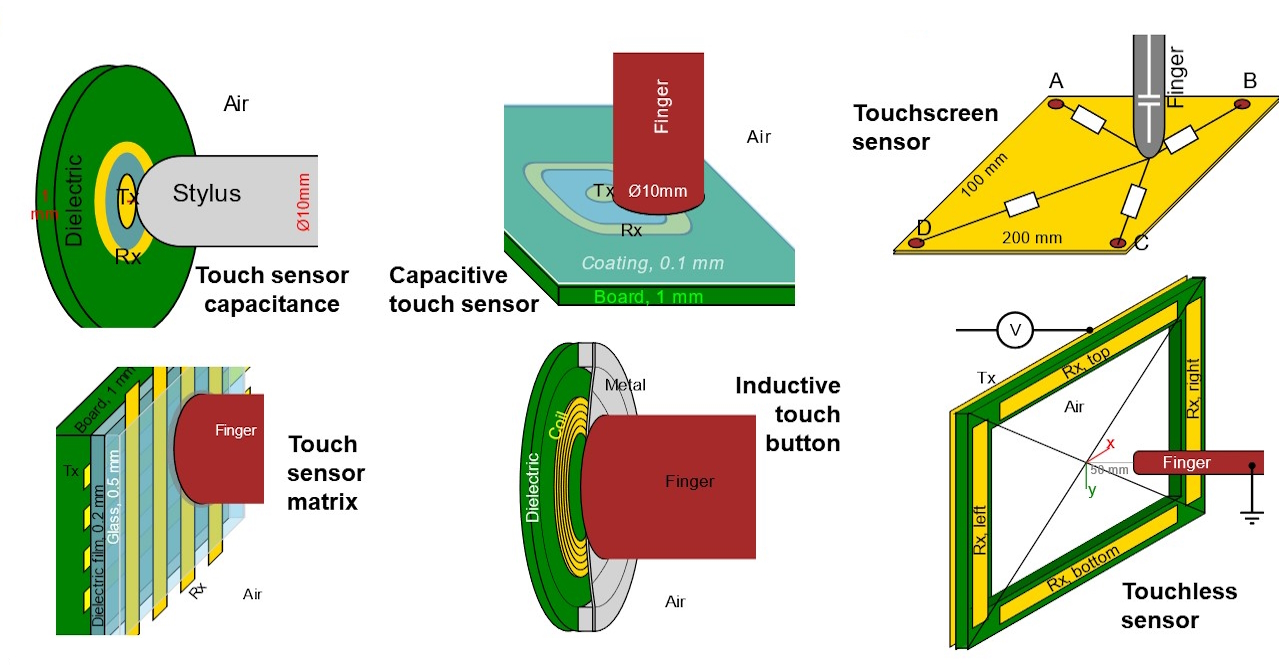
QuickField can be useful for designing touch interfaces that can detect the position of a finger, or stylus, pointed to visual controls on the screen. Capacitive or inductive sensors can be used for touch interfaces and can be analyzed using QuickField. For capacitive sensors, the software models the electric chargers and voltages on electrodes as they are affected by the proximity of an operator’s finger or a stylus. The software can also be used to model inductance changes in a coil as a result of pressure applied by a finger or stylus to a conductive foil adjacent to the coil (Figure 2).
Signal chain explorer (SCE) from Robust Circuit Design enables embedded system designers to model the circuitry extending from a sensor to the analog-to-digital (A/D) converter. SCE represents the signal chain as a series of stages with each stage consisting of a specific functional element. The combined elements in the signal chain provide the signal conditioning needed to support accurate digitization of the sensor output. Elements that can be modeled with SCE include the sensor, low pass and high pass filters, multiplexors, shunts, series branches, closed-loop gain stages and the A/D.
Designers can use SCE to calculate the effective number of bits (ENOB) and signal to noise ratio (SNR) of a signal chain considering a wide range of parameters like thermal noise, thermal transient distortion, electromagnetic interference (EMI), power and ground path fluctuations, wiring parasitic, peaking and oscillations. SCE provides designers with tools for constructing a signal chain including simple parameter and equation entry, fast and accurate performance calculations, quick charting and an integrated set of interfere models to help identify common signal chain performance issues and assist designers to find the boundaries of signal chain performance.
Summary
Sensors provide critical links between the world and electronic systems. There’s a wide range of sensor technologies and an even wider range of sensor applications. Fortunately, there’s also a wide range of EDA tools available to designers to support rapid integration of sensors. Those tools are available from sources like component makers, general EDA tool makers and specialist EDA tool suppliers.
References
QuickField field modeling, Tera Analysis
Sensor Fusion and Tracking Toolbox, MathWorks
Signal Chain Explorer, Robust Circuit Design